 MathLive
Write math as fast as you think.
A visual math editor for Obsidian. Type formulas like you'd write them, find them by name, draw them on your phone, or scan them from anything on your screen.

No LaTeX to memorize
Type math the way you'd write it. MathLive keeps plain LaTeX in your Markdown, so your notes stay yours.
$x=\frac{-b\pm\sqrt{b^2-4ac}}{2a}$Every way to get math into your notes
Whether you know the formula's name, have it on paper, or see it on your screen.
Find a formula
Search thousands of formulas by name, by what they describe, in any language, or by LaTeX, and put the one you want in your note. Not in the library? Write it with AI writes it for you.
Free, no account
Draw a formula
Draw with your mouse or pen, or scan the QR code and write on your phone. The formula shows up on both screens as you go, with nothing to install on the phone.
Mouse, pen or phone

Magic edit
Pick Magic edit in a formula's ✨ menu and say what to change: “solve for r”, “square the denominator”, “make it a cube root”. Type it or speak it, and Undo is one click away.
Type it or say it
Turn a PDF into notes
Lecture slides, papers and handwritten pages become a Markdown note next to the PDF, with every formula ready to edit. Convert all the pages or only the ones you need.
Printed or handwritten
Scan any formula on your screen
Drag a box around a formula in a PDF, a website or any other app, or scan a screenshot you copied. Pick an example to see what comes back.
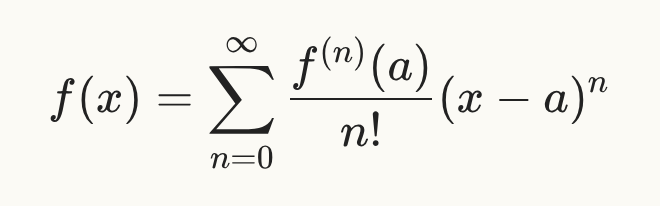
f(x) = \sum_{n=0}^{\infty} \frac{f^{(n)}(a)}{n!}(x-a)^{n}Everything stays in your notes
Edit formulas where they are
Inline $…$ and block $$…$$ math become live editors right in Live Preview.
Math keyboard
Fractions, roots, integrals and Greek letters a click away, plus a larger editor for long expressions.
Clean notes
A formula's two small buttons only show when you point at it. Everything else is in one ✨ menu.
Plain Markdown
Saved as ordinary LaTeX. Turn MathLive off and your notes look exactly the same.
Self-hosting option
Point MathLive at your own scanner to keep images on your machine. Free.
Private by design
No ads, no tracking, and we never store the images you scan. Privacy
See it in two minutes
Everything new in MathLive 2.2, recorded in a real vault. What's new has the details.
Up and running in a minute
Install the plugin
Find MathLive in Obsidian's community plugins and click Install. The editor works right away.
Connect in one click
Click Connect in MathLive, sign in with Google and approve. Your account gets 10 free scans to start, then 5 free every month. How connecting works
Scan, draw and edit
Each scan, drawing or magic edit uses one scan. Unlimited is $6 a month or $69 once.
Frequently asked
Is MathLive free?
The editor and Find a formula are free, and the editor is open source, with no account needed. Scanning, drawing, Magic edit and Write it with AI run in the cloud and come with 10 free scans to start, then 5 free every month per account. For more, unlimited plans are on the pricing page. Scanning with your own self-hosted server is free.
What uses a scan?
Scanning an image, inserting a drawing, a magic edit that changes the formula, and a formula written with AI each use one scan. Searching the formula library and previewing a drawing are free. Turning a PDF into notes uses one scan per page on the free plan; Monthly includes 500 pages a month and Lifetime 300. Blank pages and failed attempts never count.
What happens to the images, recordings and PDFs I send?
They go over an encrypted connection to our server, which sends them to AI models to read the math or make the change, and returns the result. We don't store your images, drawings, recordings, PDF pages or the formulas that come back. We keep a record that a scan happened (time, size, success) so we can count scans and keep the service reliable.
Details are in the privacy policy.
Does it work on mobile?
MathLive works in Obsidian 1.1.0 or newer on desktop: Windows, macOS and Linux. You can still use your phone to draw: scan the QR code in Draw formula and write with your finger. No app needed.
Can I get a refund?
Yes. See the refund policy, or write to us from the contact page.

Made by Dan Zilberman
“I take my math and computer science notes in Obsidian, and writing formulas there was slow. I built MathLive so dense, technical ideas are as quick to capture as plain text.”
Follow my work